
Harness console & Project detail
Since November 2026 the Channel console, Project detail and entry pages follow a ChatGPT-style harness layout. The point is not a reskin: reading, identity and controls are separated — content owns the main column, identity lives in metadata, controls recede to hover and edges.
Three principles
- Reading first: the thread is
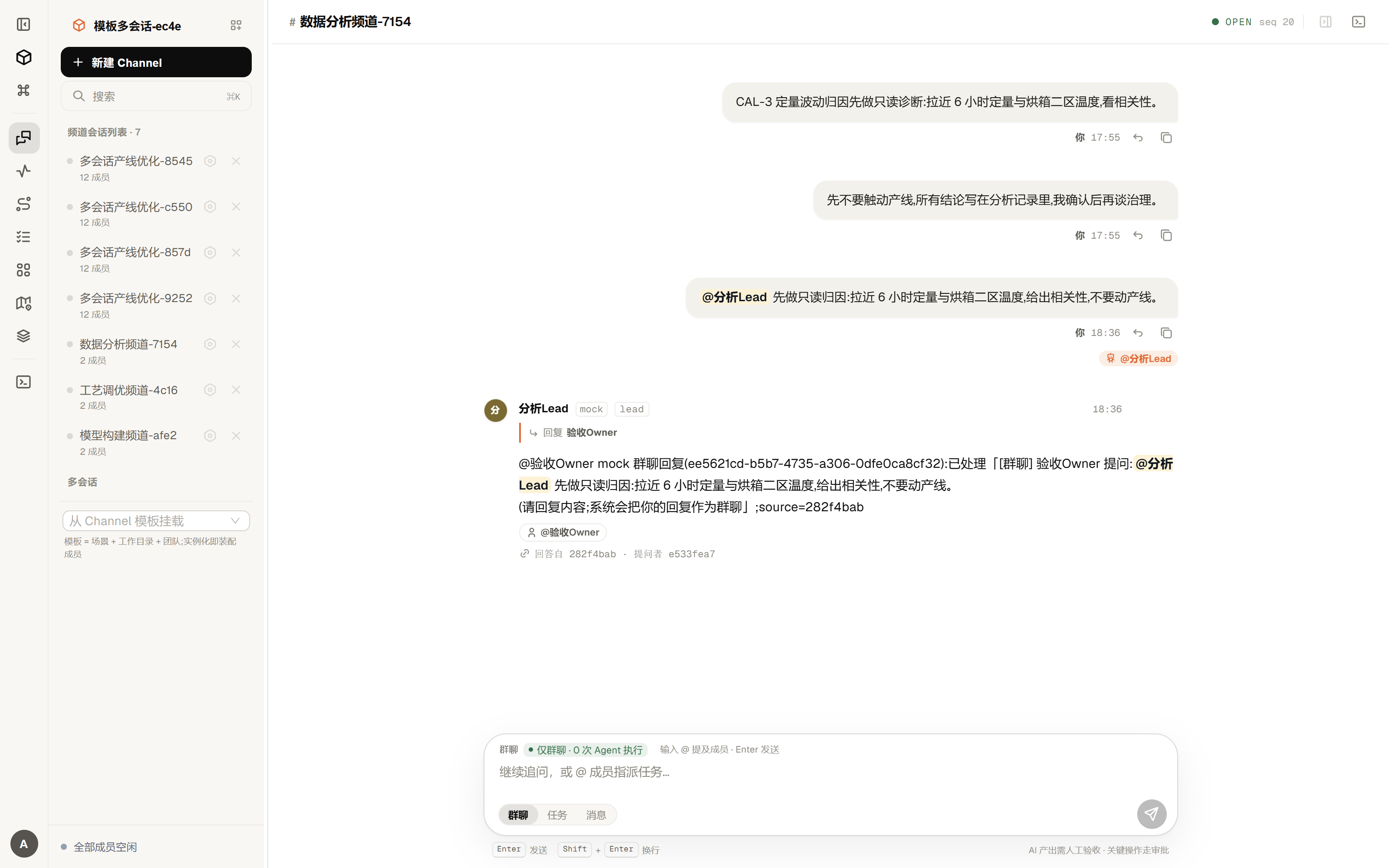
min(800px, 100% - 64px)wide, line-height 1.74, message gap 18px. Agent replies are full-width reading blocks, not bubbles. - Identity visible: every agent message shows its harness chip (omp / dsh / codex / mock …) next to the name, sourced from the same agent row as AgentBlock. The role badge is neutral grey.
- Controls recede: the composer went from "three layers of chrome + a large accent" to "one weak status readout + a 26px input card". The send button is black/white; orange is reserved for live / pending approval.
Channel console
| Region | Content | Design notes |
|---|---|---|
| Icon rail | Overview, chat, task board, sessions, timeline | 56px rail; active view marked by a 2px warm-orange tick |
| Channel sidebar | Channel sessions, member counts, template mount | Counts move into the group label; zero busy/task counts are omitted; ops reveal on hover |
| Thread | Messages + composer | 800px reading column, full-width agent blocks, user bubbles on the right |
Message metadata:
- Agent: avatar + name + harness chip + role + time; user: right bubble + time, no avatar column.
- Empty-state title uses
clamp(26px, 4vw, 34px). - The status line is a 10.5px weak readout (e.g. "群聊 · only group chat · 0 agent executions"), not a colored chip.
Composer:
- 26px radius, padding
10px 12px 7px 16px, min-height 40px; - mode segment (group / task / message) uses a neutral fill for the selected state;
- 34px send button in black/white;
Entersends,Shift + Enterinserts a newline — unchanged.
Views: chat / task board / sessions / timeline all preserved; switching keeps the channel and draft.
Project detail
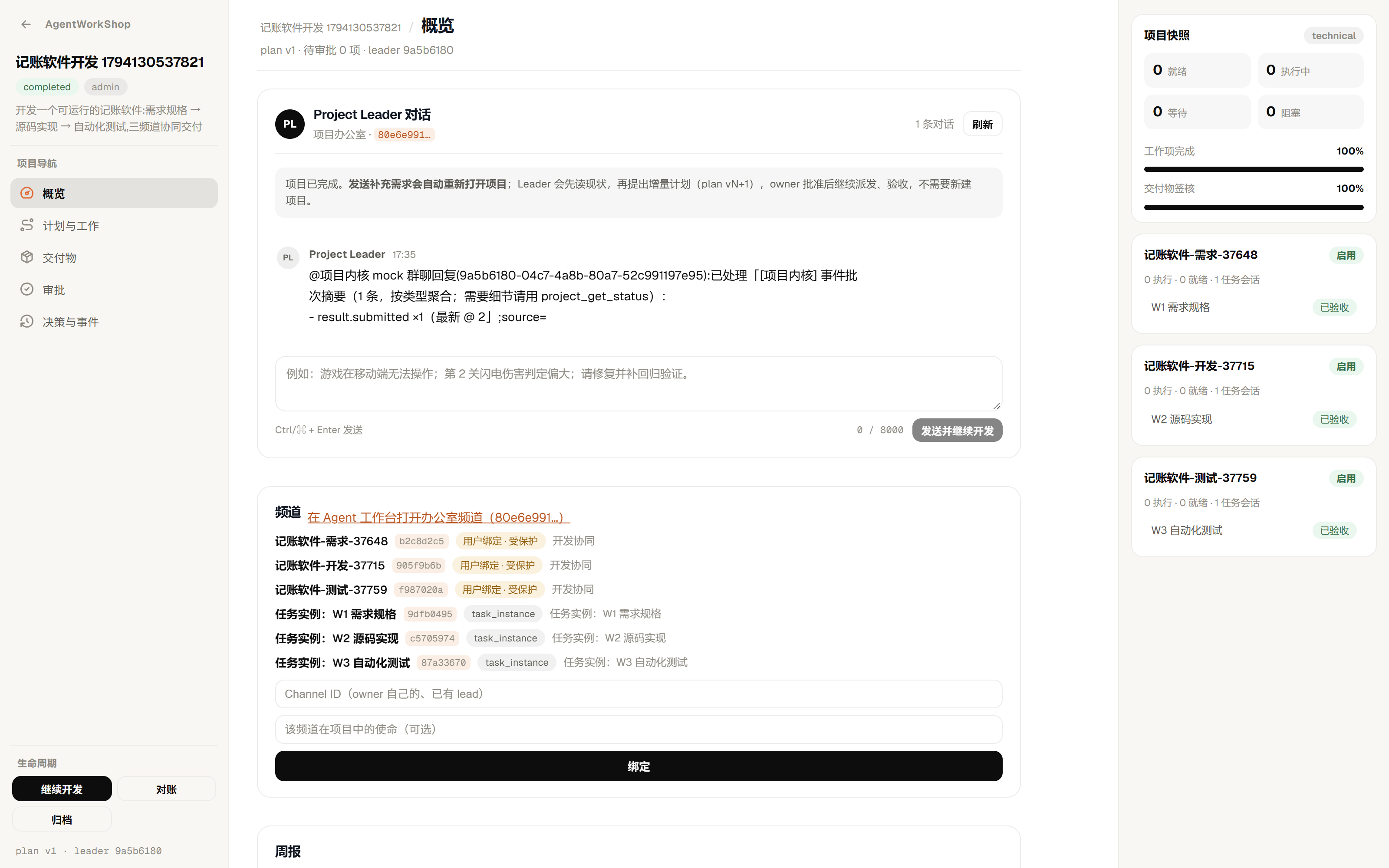
- Left navigation: overview / plan & work / deliverables / approvals / decisions & events;
- Main column: breadcrumb (project / section), reading width capped at 880px; no duplicate page title;
- Right rail: 312px project snapshot (ready / running / waiting / blocked, work-item completion, deliverable sign-off);
- Leader chat: user messages lose the avatar and become right bubbles; agents are full-width blocks; the composer drops from 3 lines to 2;
- Channel bindings: UUID wall replaced by "channel name + short id"; task-instance rows show the charter label;
- Lifecycle: continue / reconcile / archive pinned at the bottom of the left rail.
Entry pages
| Page | Change |
|---|---|
/projects | Container 920 → 1080px; three-column create form (name / objective / engine) with a full-width description; card grid minmax(318px, 1fr); hover lift; completed badge is green |
/workshop | Container capped at 1240px and centered; 336px card grid; oversized add tile |
Invariants
- Every
data-testidis preserved (project-tabs,project-leader-chat,tab-*, …); - Keyboard shortcuts, @-mention parsing, delivery ledger, HITL semantics and REST APIs are unchanged;
- The project state machine, observability polling and approval logic are unchanged;
- At 390px the sidebar collapses and the composer never overflows.
Verification
- UI interaction suite 12/12 (real Chrome: channel load, four view switches, message survives reload, five Project tabs, testids present, no page errors);
- typecheck ✔, lint 0 error, unit 1253 pass / 0 fail / 2 skip;
- Before/after screenshots and the design canvas live in
docs/design/2026-11-08-harness-ui/.
Related: Channel sessions & agent lifecycle · Project mode · Multi-harness agent teams